
Technology diversity
The Web is a very diverse deployment environment
Cannot design for one browser, platform, resolution, device, etc.
User Diversity
Users don't have the same abilities
Users with handicaps may need special accommodations
The purpose of the Web is large-scale open communication
Approx. 20% of the U.S. live with some kind of disability
Approx. 14% of the U.S. is over the age of 65
From a practical standpoint, the market exists and is significant
From a legal standpoint, failure to provide accommodations can result in litigation
Accessible - Able to be used by people with handicaps. Usable for this audience
Accessibility - Focusing on creating accessible sites
Primary Concerns
Visual Impairment - Low vision or blindness
Motor Impairment - Difficulty using traditional point devices and/or keyboard
Designing for accessibility is often neglected
Requires additional effort on the part of the developers
Research sponsored by the World Wide Web Consortium (W3C) www.w3.org
"The power of the Web is in its universality. Access by everyone regardless of disability is an essential aspect"
"The Web is fundamentally designed to work for all people, whatever their hardware, software, language, culture, location, or physical or mental ability. When the Web meets this goal, it is accessible to people with a diverse range of hearing, movement, sight, and cognitive ability"
Reccommendations:
Establish a team or individual whose purpose is to learn about accessible design
Have the above promote and educate design team(s) about importance, techniques, etc
Principle: Make sure contrast between text and background yields readable text
Why? Many people are color blind or lose visual acuity with age of handicap. Even people without handicaps can experience eye strain
Test: View on monochrome monitor, or print web page with background showing (monochrome)
Tools: There are many online tools that will perform these tests, including W3C and
Paletton
Remedy: Adjust contrast as needed

Principle: Make sure page is navigable without a mouse
Why? Special devices may be used or user's fine motor skills lacking
Test: Use keyboard-only to navigate the site. Ensure that all links and controls are accessible. Check tab order
Remedy: Remove controls or provide alternatives when problems discovered. Make sure all non-accessible navigation is paired with accessible alternative
W3C WAI has a Working Draft on some guidelines for first review of a website for web accessibility. These items include:
Page title
Image text alternatives (alt attribute)
Headings
Contrast ratio ('color contrast')
Resize text
Keyboard access & visual focus
Forms, labels, and errors
Multimedia alternatives
Basic structure check
Be aware of the need for accessibility and factor accessibility needs into your design process
Test accessibility before site deployment. Use human testers with accessibility needs if possible
Be attentive to new tools or techniques that improve accessibility, and cautious of techniques that create accessibility problems
Set a goal of progressively improving your development team's knowledge of accessibility
When creating a site, we've already thought about the users'
Desires & goals
Computer & Internet skills
Education, gender, age, occupation, etc
Usability testing is a great way to check if the site is meeting those needs
Usefulness and utility can be measured
Their satisfaction with the site – “likes” and “dislikes” – can be recorded as well
There are several types of testing, but the most common one involves watching users use the site and gathering data about what they’re thinking and doing
People who match the personas are a good starting point
Find representative users from each of your audience groups
Within groups, try to find a mix of skill and experience levels
Most tests are done with 5 – 10 users, but even 1 or 2 may give you some good information
Include the most commonly completed and most important tasks
Tasks should not be leading, and if possible, shouldn’t contain the names of links or buttons to be clicked
When you write them, decide what defines a “success”
How long should it take?
What steps are required to complete the task?
Do errors or different paths matter?
Consent forms
Audio recording
Video recording
Participation in a research study
Morae is software that can be installed on a laptop to record a test
It can record the user’s face with a webcam
It records what happens on the screen along with mouse clicks and keystrokes
If something like this isn’t available, you can record with a video camera, use screen capture software like Camtasia or OBS (Open Source), or just take good notes
Introduce yourself and explain the purpose and process for the test
Let them know that you’re testing the site, not their abilities
Give them the tasks
Watch what they do, and be sure to take note of anything that gave them trouble
Try to remain neutral and try not to help them complete the tasks
This is much harder when you’re testing your own design
If they get stuck somewhere or you’re not sure what is happening, ask neutral questions like “What do you think about X?” or “What are you doing now?”
Remember that users are more likely to be nervous and unsure of themselves when they’re being watched
After the tasks are finished, you may want to wrap up with a questionnaire to gather their overall opinions about the site
Depending on the size of the site, a test should take about 30 minutes – 2 hours
Steve Krug
Excellent book about website design and testing
You can read it at O'Reilly Books through Sherrod Library
Reports from a usability test include information about what happened in the test
Major usability issues that were uncovered, with recommendations for how to fix them
Description of user demographics
Objective measurements (time, number of errors, completion rate)
Subjective measurements (satisfaction and opinions)
Ideally, this is part of an iterative process
Design, test, redesign, test, design, test, redesign, test, design, test, redesign, test, design, test, redesign, test, design, test, redesign, test, design, test, redesign, test, design, test, redesign, test, design, test, redesign, test, design, test, redesign, test, design, test, redesign, test, design, test, redesign, test, design, test, redesign, test, design, test, redesign, test, design, test, redesign, test, design, test, redesign, test, etc.
Either self-host the site or outsource to a hosting company
Self-hosting:
Establish computer system and needed software
Find an ISP to provide Internet connection (Bandwidth is key issue)
Work with ISP and/or InterNIC for an IP address
Associate Domain Name with IP address
Outsource to hosting company:
Contract with company for server space, functionality, and bandwidth
"If you build it, they will come"--doesn't (necessarily) work on the web
Have a memorable domain name and promote
In other media (TV, print, signs, bags, packages, etc.) - Branding
In paid online advertising
Using affiliates and cross-promotion
Search engine placement (free and paid ad)
Social Media
Other web sites that promote ours to receive:
Our promotion of their site on ours
A commission every time someone clicks on our ad or visits our site from theirs and makes a purchase
Pay-per-click vs. pay-per-sale
Establishing an effective affiliate program takes time, ongoing oversight, and legal consultation
Pay per Sale (PPS)
Publisher is paid on the basis of referral sales
Example - Publisher is only paid if user clicks the ad on publisher site and then makes a sale on the advertised site
As very low percentage people ends up doing the sale , The percentage commission is highest in case of PPS programs
They pay between 4-20% of each sale
Pay per Click (PPC)
Publisher is paid on the basis of Ad clicks that take the user to the advertised site
As Average number of people clicks the ads so this program offers less percentage commission than PPS
They pay between $.25 to $1.25 for each click depending on the product and number of unique clicks
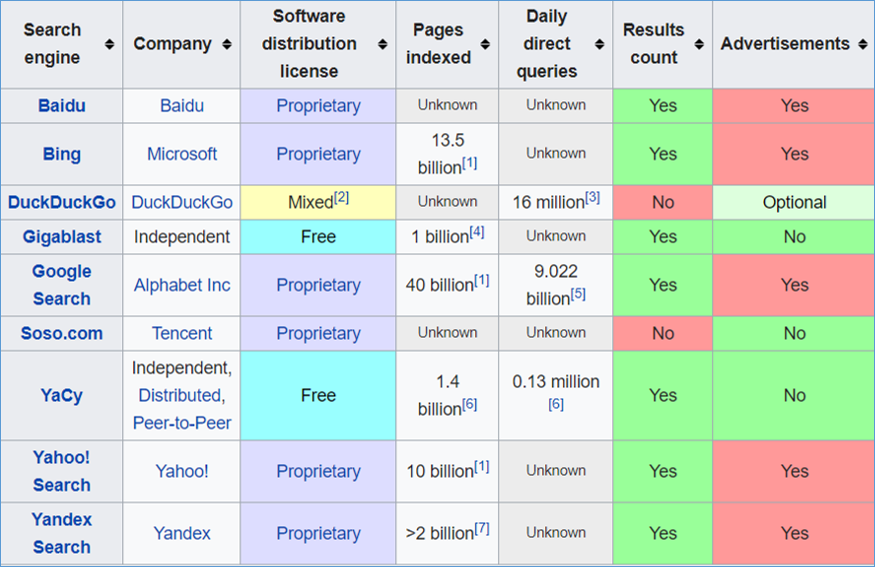
| 4,464,000,000 | |
| Bing | 873,964,000 |
| Baidu | 583,520,803 |
| Yahoo | 536,101,505 |
| Other (AOL, Ask, etc.) | 128,427,264 |
Make sure that, whereever possible, you request that a search engine add your site
http://search.yahoo.com/info/submit.html
https://www.google.com/webmasters/tools/submit-url?pli=1
http://www.bing.com/toolbox/webmaster/
Keyword advertising placement may be worthwhile investment
Many search engines rely on spiders and robots. Make sure meta information provides keywords and descriptions
Seems trivial, actually very complex to do well.
1st generation search engines:
Keyword-based searches
Problems with synonyms and retrieval quality
Only information on the pages are used
Easy to cheat/fool (adding keywords multiple times in hidden text)
Modern search engines
Site hyperlink structure important
Links to documents represent a deliberate act and a “quality indicator”
Use of keywords in content
Almost 20% of users
Vision
Motor
W3C Web Accessibility Initiative
IRB
Representative users
Morae / Video
Reports
Publishing a website
Search engines
Plan for drawing audience
Plan for fostering loyalty
1. Approximately how many people in the US live with some form of impairment?
A. One in four
B. One in five
C. One in three
D. One in seven
2. What are the two forms of diversity cited in Web Design?
A. Technology
B. Content
C. Designer
D. User
3. What are the two primary impairments that affect user experience (UX) and the Web?
A. Vision
B. Hearing
C. Math
D. Motor
4. What is the most important concern relating to vision impairment and web design
A. Contrast
B. Color
C. Hue
D. Saturation
5. (T/F) You can 'fool' search engines by including multiple copies of keywords in the content as hidden text
A. True
B. False
6. (T/F) Using an affiliate program is a quick and easy way to guarantee increased traffic
A. True
B. False
7. (T/F) You can register a site directly with some search engines to improve its likelihood of appearing nearer the top of search results
A. True
B. False
8. When conducting testing using human subjects, what is the greatest concern?
A. That the subject is put at ease
B. That the subject understands that you are testing your site, not their abilities
C. That you record the test
D. That no harm will come to the subject as a result of testing